Know what needs you in 3 seconds.
Instead of 100+ mixed emails, CCs, and automated alerts, your inbox opens pre-sorted into four operational buckets by whose turn it is and when the clock expires.
Outlook + AppFolio Operating Layer
Same Day Response sorts your Outlook queue by whose move it is, pulls the live work-order and lease facts from AppFolio, and stages the reply in your Drafts. You review, press Send, and never drop a follow-up.
4 questions · Instant bottleneck diagnosis · No email required



Read the request. Review the response.
The starting workflow uses human-reviewed drafts.
Start with one company-managed Outlook workflow. People control messages and decisions.
01 · For the Person in the Seat
Property managers don't fall behind because they don't care. They fall behind because every reply requires hunting across AppFolio, Leases, and Calendar tabs while new messages bury the threads waiting on a vendor.
Instead of 100+ mixed emails, CCs, and automated alerts, your inbox opens pre-sorted into four operational buckets by whose turn it is and when the clock expires.
Before you click the email, the unit, active work order, vendor schedule, reserve limit, and open calendar slots are already attached side-by-side.
A grounded reply is already waiting in your real Outlook Drafts folder. You stay in complete control of every word, and nothing ever sends automatically.
Every promised 3:00 PM update and vendor callback is tracked automatically until the thread is closed.
Flags reserve limits and missing vendor confirmations before a draft can be sent out.
Connects directly to one company-managed Microsoft 365 queue without changing your PMS.
Synthetic follow-through example
Three matters. Different reasons to act. Select one to see the owner, action and next update.
Approval first, then today’s update and tomorrow’s access blocker. This is an illustrated ordering decision.
Selected matter
Still open: the repair decision and completion evidence are missing.
Selected matter
The repair remains open. An update promise is not completion evidence.
Selected matter
An unconfirmed appointment is not completed work.
This is a website illustration of the response-work model, separate from the app references above. It does not demonstrate automatic ranking or verified repair completion.
PME 4-Pillar Response Inspector
Under Property Management Excellence (PME), every response must satisfy four pillars before human review. When authority or spend is unconfirmed, the [CONFIRM WITH APM] gate locks draft export to prevent false done.
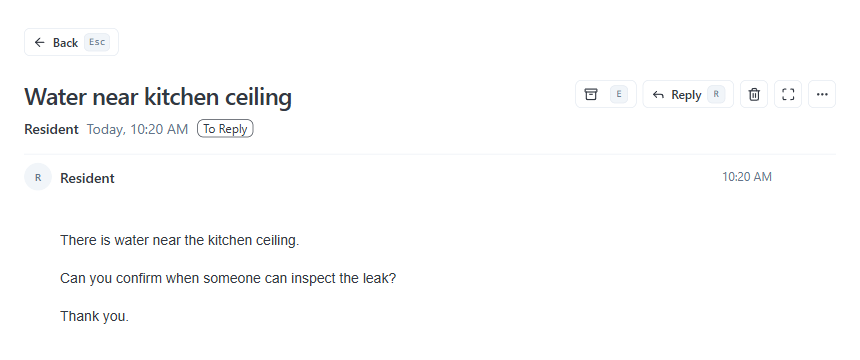
Thank you for contacting us regarding the water leak near the kitchen ceiling. Work order #4821 has been dispatched to Apex Plumbing. Operations team is coordinating access with the technician, and a vendor will inspect the leak today at 2:00 PM. We will send our next status update today before 5:00 PM PT.
Work order #4821 has been dispatched to Apex Plumbing
Verified facts from PMS records or contractor status.Operations team is coordinating access
Single accountable person holding the ball.Vendor will inspect the leak today at 2:00 PM
Concrete operational action moving work forward.Today before 5:00 PM PT
Explicit commitment when the recipient will hear back.All 4 PME pillars satisfied with zero unresolved bracket tokens. The draft is placed in Outlook for property manager review before sending.
Safety invariant: Autonomous sending is permanently disabled (send: false). AI drafts require human verification before release.
Transparent Commercial Ladder
Every stage of Same Day Response is published with clear pricing, unit boundaries, and 100% fee credit toward your ongoing subscription.
Stage 0 · Diagnostic
$0
Free self-serve diagnostic
Stage 1 · Baseline Audit
$2,500
Fixed 5-day baseline audit
Stage 2 · Guided Pilot
$3,500
8-week guided operational pilot
Stage 3 · Core Recurring Subscription
Every annual subscription includes full credit of your $3,500 pilot fee.
$750/mo
or $650/mo billed annually at $7,800/yr
$1,500/mo
or $1,250/mo billed annually at $15,000/yr
$2,500+/mo
+$0.60/unit/month above 3,500 units
Start where the work is
Connect one company-managed Outlook workflow. Safe boundaries, drafted responses, and zero disruption to your property management software.
Choose your most active inbox — maintenance, leasing, or owner inquiries. Focus where delays hurt most.
Every reply is prepared as a draft. Your team reviews and approves before anything leaves your inbox.
AppFolio, Yardi, and Rent Manager stay your source of truth. We connect directly through Outlook.
Operator perspective
Created by Anthony A. Luna, a property management operator and author.
The starting question: what is still waiting after someone replies?
Before you start
One company-managed Outlook workflow. We review scope and access first. Other systems require a compatibility review; a personal inbox is outside the initial scope.
The starting workflow uses human-reviewed drafts. People control external messages and approval decisions.
A sponsor, a workflow owner, representative matters and approved access. We agree on scope and privacy boundaries before connecting anything.
You get an immediate finding and practical next step. Copy it, change your answers, or request a written recommendation from Anthony. A meeting is optional.
Response Reliability Review
Your role. Four questions.
A practical recommendation without entering your email.
Optional written recommendation afterward.
The Same Day Response Brief